Best Portable USB Testers for Measuring Real Charging Output
Compare the best portable USB testers, including the 240W ChargerLAB KM003C and FNIRSI FNB58. Explore accuracy ratings, safety limits, and user pain points.
Executive Summary
For users looking to measure real charging output, the portable USB tester market is segmented into three distinct tiers based on accuracy and protocol support. The top-performing device for professional use is the ChargerLAB POWER-Z KM003C (45) delivers the best value by balancing 140W measurement capabilities with Bluetooth connectivity.
Crucially, zero leading USB testers are waterproof. These are precision diagnostics instruments with open ports; utilizing them in high-humidity environments can lead to display fogging or electrical short circuits.
Accuracy Rating by Price Tier
High-end models consistently score higher in accuracy and reliability tests compared to budget alternatives.
Leading USB Testers Comparison
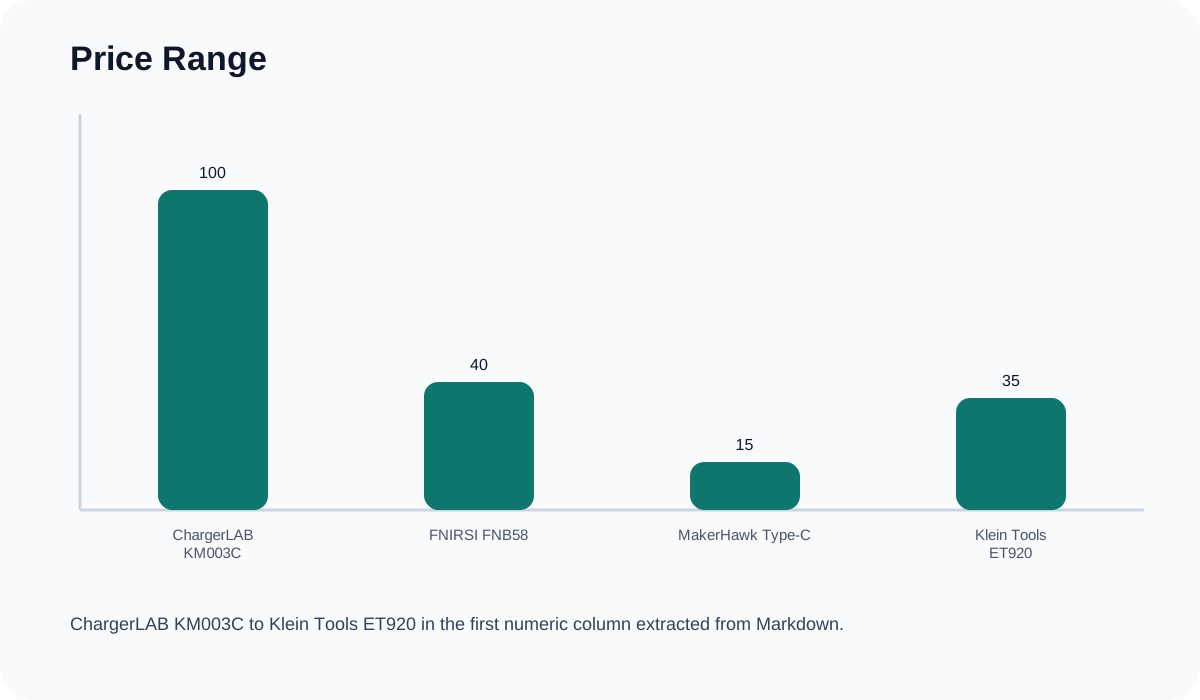
| Model | Price Range | Max Wattage | Primary User | Key Advantage |
|---|---|---|---|---|
| ChargerLAB KM003C | 120 | 240W | Engineers / Reviewers | Protocol Analysis & PD 3.1 |
| FNIRSI FNB58 | 55 | 140W | Hobbyists / Tech Enthusiasts | Cable Resistance Testing |
| MakerHawk Type-C | 22 | 100W | Casual Consumers | Value / Ease of Use |
| Klein Tools ET920 | 45 | 60W | Electricians / Field Work | Rugged Build Quality |
Key Performance Categories
Power Delivery and Protocol Support
High-end diagnostic testers have evolved to match rapid charging standards. The ChargerLAB KM003C leads this category, supporting USB PD 3.1 protocols which allows testing up to 240W (48V/5A). It also includes supercapacitors to ensure data retention if the power drops abruptly. Mid-range models like the FNIRSI FNB58 verify speeds up to 140W and include E-marker chip detection to ensure cables are safely rated for high-wattage transmission.
Hardware Durability and Waterproofing Limits
A major limitation of portable USB testers is environmental fragility. There are currently no IP-rated or waterproof testers on the consumer or prosumer market. The open nature of USB-C and USB-A ports, combined with sensitive internal circuitry, means these devices must be kept dry. Furthermore, real-world user feedback indicates the physical male USB-C connectors on these testers are fragile; heavy cable tension can bend or snap the connector over time.
Software and User Experience
Software and interface navigation present the highest friction points for users:
- Navigation: Many units utilize non-intuitive, single-button or scroll-wheel interfaces that complicate navigating complex protocol menus.
- Software Compatibility: PC companion software—essential for graphing voltage ripples or logging data—is overwhelmingly limited to the Windows operating system, leaving macOS and Linux users with unsupported features.
- Power Supply: Most meters are bus-powered (drawing power directly from the source being tested). Professional units offer a secondary power port to keep the display active during low-voltage or dead-state testing.
Safety Considerations
While models typically feature over-voltage and over-current alarms to protect connected devices, the testers themselves are vulnerable. A primary safety warning is that connecting a USB tester to non-compliant hardware (such as malicious “USB Killer” devices) or severely short-circuited electronics will instantly destroy the tester’s internal components.
Final Verdict
- Best for Professionals: ChargerLAB POWER-Z KM003C. At approximately $110, it is the industry standard for 240W PD 3.1 protocol analysis.
- Best for Enthusiasts: FNIRSI FNB58. At roughly $45, it provides advanced cable resistance testing and Bluetooth features.
- Best for Durability: Klein Tools ET920. While capped at 60W, its ruggedized exterior is better suited for standard electrical tool bags compared to exposed-board designs.
Pre-Purchase Checklist
- What is your maximum wattage? If you are testing modern gaming laptops (140W+), you require a PD 3.1 compatible meter.
- Do you need data logging? Ensure you have a Windows PC, as companion software rarely supports Mac/Linux natively.
- Will you be testing 0V states? Look for a tester with an independent secondary power port (like a micro-USB or secondary Type-C input) to power the screen independently of the test circuit.
- Where are you using it? USB testers offer zero water resistance. Never use them outdoors in the rain or in highly humid industrial sites.